Insights

How to Plan a Successful Hybrid Event

How to Plan a Successful Hybrid Event

How to Plan a Successful Hybrid Event

Hybrid events allow people to participate from different locations without reducing the value of the in-person experience. But delivering one successfully requires more than placing a camera at the back of the room and starting a livestream.

Hybrid events allow people to participate from different locations without reducing the value of the in-person experience. But delivering one successfully requires more than placing a camera at the back of the room and starting a livestream.

Professional camera filming a live cookery demonstration for an in-person audience and remote viewers.

Hybrid events are no longer simply an alternative to meeting in person. They are now a deliberate event format used by organisations that want to reach wider audiences, improve accessibility and make their content available beyond the room.

Conferences, awards ceremonies, product launches, training sessions and company meetings can all benefit from a hybrid approach. The important part is ensuring that the online audience receives a considered experience rather than a basic recording of what is happening on stage.

What is a hybrid event?

A hybrid event combines an in-person event with an online experience that allows remote attendees to watch and participate in real time.

However, a successful hybrid event is more than an in-person event with a livestream added to it. The programme, technology and audience journey should be planned for both groups from the beginning.

  • Watch speakers and presentations live

  • Submit questions to presenters

  • Participate in polls and surveys

  • Join moderated discussions

  • View supporting content and downloadable resources

  • Move between different sessions

  • Rewatch selected content after the event

The aim is to create one connected event with two ways to attend.

When does a hybrid format work well?

Hybrid production is particularly valuable when an event needs to reach people across different offices, regions or countries.

It can work well for:

  • Conferences and panel discussions

  • Internal company communications

  • Training and educational events

  • Product launches and demonstrations

  • Awards ceremonies

  • Investor or stakeholder presentations

  • Multi-location events

  • Events involving international speakers

  • Programmes containing valuable reusable content

A hybrid format is not automatically the right choice for every event. It should support a clear objective, such as increasing attendance, improving accessibility, connecting separate locations or extending the useful life of the content.

What are the benefits of hybrid events?

Reach a wider audience

Venue capacity, travel costs, schedules and location can prevent people from attending an event in person. A hybrid option allows those people to participate remotely without limiting the experience for guests in the room.

It can also help organisations reach audiences in other parts of the UK or internationally without requiring every attendee to travel.

Improve accessibility

Remote access can make an event more inclusive for people who cannot comfortably travel or attend a busy venue. Hybrid platforms can also support features such as live captions, accessible presentation materials and on-demand viewing.

Accessibility should be considered during the initial planning stage rather than added shortly before the event.

Create valuable content

The cameras, audio systems and presentation feeds used for a hybrid event can also create high-quality recorded content.

Individual presentations, panel discussions and interviews can be edited into training resources, internal communications, social content or on-demand sessions. This gives the event value long after the live programme has finished.

Offer greater flexibility

Attendees can choose the most suitable way to participate. Someone might attend the main event in person, watch a missed session online later or join remotely because their plans have changed.

This flexibility can improve attendance while allowing the physical event to retain the atmosphere and personal interaction that make live events valuable.

Plan for two audiences from the beginning

One of the most common hybrid event mistakes is designing everything around the audience in the room and treating online viewers as an afterthought.

The event schedule should account for how both audiences will experience:

  • Introductions and housekeeping

  • Speaker presentations

  • Questions and answers

  • Breaks and programme changes

  • Audience participation

  • Videos and supporting content

  • Technical interruptions

  • The end of each session

An online audience cannot always see or hear what is happening away from the stage. Presenters should acknowledge remote attendees, explain activities clearly and avoid relying on visual references that are only understandable inside the venue.

A dedicated online host or moderator can help welcome viewers, manage questions, explain breaks and maintain engagement throughout the broadcast.

Stage Engage camera operator filming a presenter during a live event demonstration.

Professional camera operators capture clear, engaging coverage for audiences watching beyond the venue.

A successful hybrid event should feel like one connected experience, even when the audience is joining from different places.

A successful hybrid event should feel like one connected experience, even when the audience is joining from different places.

A successful hybrid event should feel like one connected experience, even when the audience is joining from different places.

Technician operating a Blackmagic broadcast control panel during a live multi-camera production.

Live vision mixing brings cameras, presentations and other video sources together into one coordinated broadcast.

What technology does a hybrid event need?

The exact technical setup will depend on the venue, audience size, programme and streaming platform. A small internal presentation will not require the same production system as an international conference with multiple stages.

Most professionally produced hybrid events will need several of the following elements.

Cameras and live vision mixing

Multiple cameras allow the broadcast to move between wide shots, speaker close-ups, audience reactions and presentation content.

A vision mixer combines these sources into the live programme. This creates a more engaging experience than relying on one fixed camera throughout the event.

Camera positions should be considered alongside audience seating, stage design and sightlines. They need clear views of the stage without unnecessarily obstructing guests in the room.

Broadcast-quality audio

Clear audio is one of the most important parts of any hybrid event. Online attendees must be able to hear presenters, videos, questions and discussions without distracting background noise or sudden changes in level.

The broadcast audio mix may need to be managed separately from the sound heard inside the venue. For example, audience reaction might be added to the stream even though it does not need to be amplified through the room.

Remote speakers must also be routed back into the venue so that presenters and the in-person audience can hear them clearly.

Presentation and video management

Slides, videos, graphics and other content need to be routed to the correct destinations. The presentation shown on the venue screen might also appear full-screen in the broadcast or alongside a camera view of the presenter.

Content should be collected, checked and organised before the event. Videos should be played directly into the broadcast system rather than filmed from the venue screen.

Suitable lighting

Lighting designed only for the audience in the room may not produce a good camera image. Presenters need consistent, flattering light that works for both the live environment and the broadcast.

Stage lighting, screen brightness and scenic elements should be balanced so that speakers remain clearly visible without losing the atmosphere of the room.

A streaming platform

The correct platform will depend on how the audience needs to participate.

Some events only require a private viewing page. Others may need attendee registration, moderated questions, live polls, breakout sessions, analytics or integration with an existing event platform.

The platform should be selected early enough for the production team to test access, branding, security and audience features before the live event.

Reliable connectivity and redundancy

A stable internet connection is essential. The venue’s available connection should be assessed and tested before the event rather than assumed to be suitable.

Where the broadcast is business-critical, the production plan should include an appropriate backup connection, local recording and a clear procedure for responding to a loss of connectivity.

Monitoring and communication

The production team needs to monitor what online attendees are actually seeing and hearing, not simply what is leaving the vision mixer.

Clear communication between the show caller, camera operators, audio team, video team, platform manager and stage team helps everyone respond quickly to programme changes or technical issues.

How do you keep an online audience engaged?

Remote attendees experience more distractions than people sitting in a venue. Long pauses, unclear instructions or repetitive camera coverage can quickly cause viewers to disengage.

Engagement should be built into the programme through:

  • Direct acknowledgement of online attendees

  • Moderated questions from both audiences

  • Live polls and surveys

  • Shorter, focused programme sections

  • Clear transitions and break information

  • Varied camera coverage

  • On-screen graphics and speaker identification

  • Dedicated online content or interviews

  • Opportunities to continue the conversation after the event

Not every interaction needs to be complicated. Even allowing remote questions to be included in a live panel can make online attendees feel that their participation matters.

Test the complete event workflow

A technical rehearsal should test the entire journey, including cameras, microphones, presentation content, remote contributors, graphics, internet connectivity and the streaming platform.

Remote speakers should join using the same equipment and location they plan to use during the event. This provides an opportunity to identify poor lighting, weak internet connections, unsuitable microphones or distracting backgrounds.

The production team should also confirm what will happen if:

  • A remote speaker loses their connection

  • A presentation fails to load

  • The primary internet connection is interrupted

  • A session runs over time

  • A microphone or camera develops a fault

  • Content cannot be shown online because of licensing restrictions

Planning these responses in advance helps the event remain controlled if something unexpected happens.

Think beyond the live broadcast

The value of a hybrid event does not need to end when the livestream finishes.

Recorded sessions can be edited and made available on demand, allowing attendees to revisit useful presentations or watch sessions they missed. Shorter clips can also be created for internal communications, marketing, training and social media.

If content will be reused, this should be agreed before the event so that recording formats, contributor permissions and editing requirements can be planned properly.

Delivering a successful hybrid event

The strongest hybrid events bring venue production and broadcast production together as one coordinated workflow.

Stage design, lighting, sound, cameras, presentation content, streaming and audience interaction should all support the same event objectives. When these elements are planned together, the experience feels natural for the audience in the room and for everyone joining remotely.

Stage Engage provides complete technical production for hybrid events, including cameras, broadcast audio, lighting, staging, video systems, presentation management, streaming workflows and technical crew.

Planning a hybrid event? Get in touch with Stage Engage to discuss the technical production and broadcast requirements.

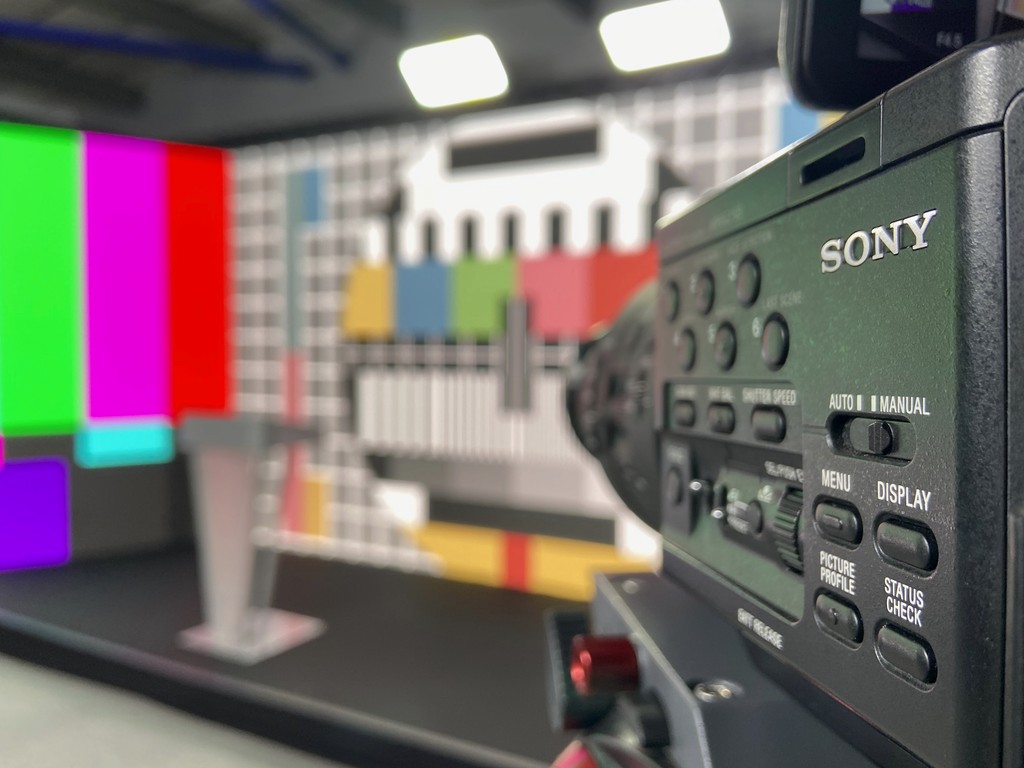
Sony professional video camera being tested against a colour chart before an event broadcast.

Camera, lighting and colour checks help maintain a consistent professional image throughout the event.

Stage Engage Sony 4K camera filming two presenters during a live event.

Broadcast-quality cameras give remote audiences a clear view of the speakers and conversations taking place in the room.

• LET’S TALK

Let’s bring your event together.

Let’s bring your event together.

Let’s bring your event together.

Tell us what you’re planning and our team will help shape the right production approach for it.

Bringing live events to life through sound, lighting, video and design.

Logo

©2026 Stage Engage Limited. All rights reserved

Offline

London: Stage Engage, 10 Brook Lane Business Centre, Brentford, London, TW8 0PP

Exeter (Head) Office: Stage Engage, Old Wheatley Farm, Exeter, Devon, EX4 2HA


London: Stage Engage, 10 Brook Lane Business Centre, Brentford, London, TW8 0PP

Exeter (Head) Office: Stage Engage, Old Wheatley Farm, Exeter, Devon, EX4 2HA